
Reduce the repeated work of collecting Jira data, rebuilding status decks and preparing the same management update every cycle.
Built for Jira Cloud
SDStatusDeck
Stop Rebuilding Status Reports.
Turn Jira data into Executive-Ready Sprint, Project and Program Reporting—with Delivery Health, Management Commentary, Risks, Capacity, Trends and Shareable Output in one workflow.
✓ Sprint · Project · Program
✓ PDF & PowerPoint
✓ Confluence Publishing
✓ Built on Atlassian Forge
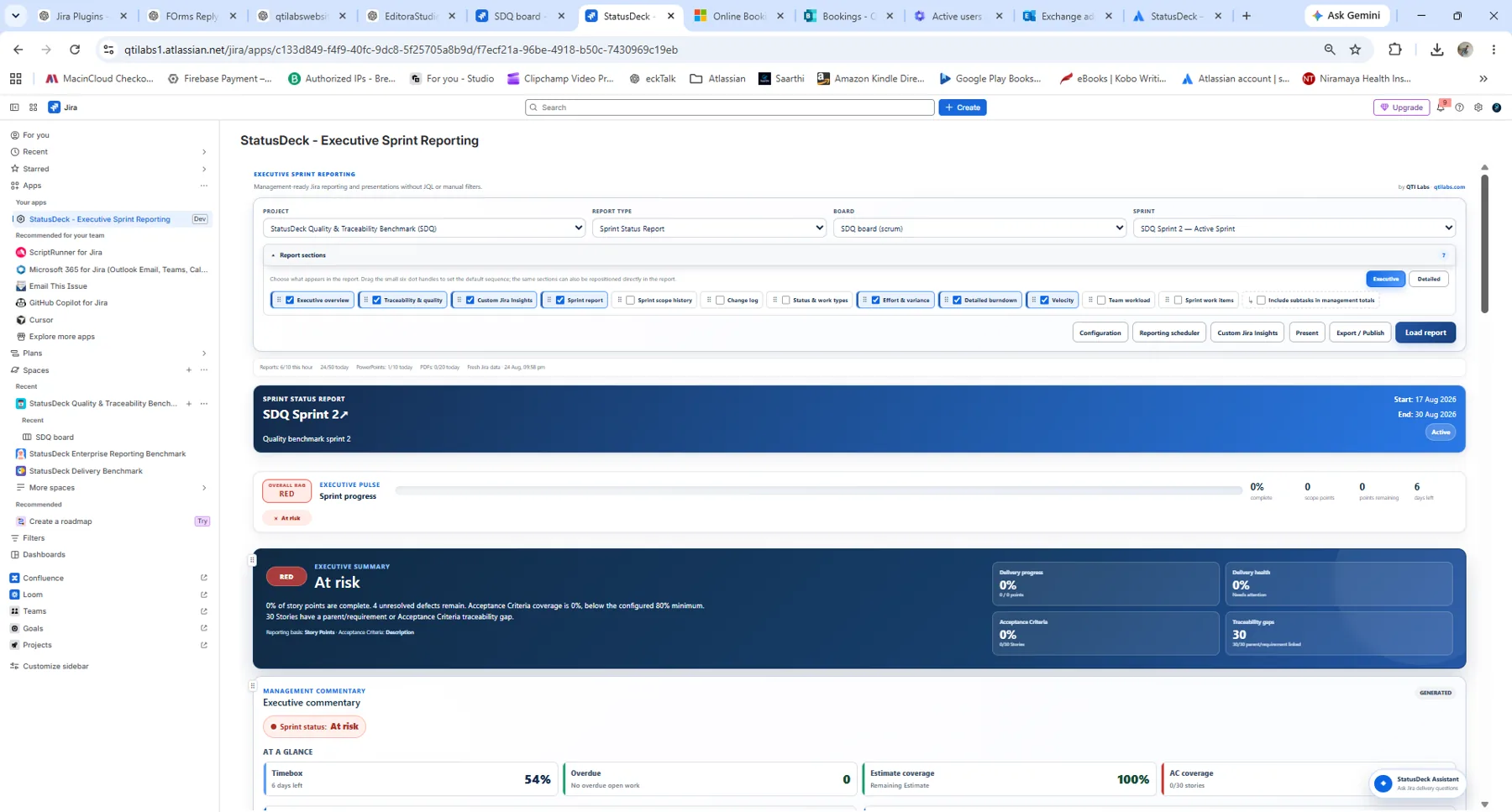
Real StatusDeck Product View
Move from a sprint view to project and program-level health without changing reporting tools.
Bring delivery progress, risks, forecast, recommended actions and Management Commentary together.
Export to PDF or editable PowerPoint, or publish a concise update and attachments to Confluence.
Why StatusDeck?
Jira Has the Data. StatusDeck Builds the Management Report.
Jira remains the operational system of record. StatusDeck is the reporting layer that packages that data for recurring leadership, customer, steering and governance reviews.
1
No Manual Collection LoopSelect the Jira context and report sections instead of rebuilding the reporting pack from scratch.
2
Management-Ready InterpretationSurface Delivery Health, risks, forecast, actions and outlook—not only raw issue lists.
3
From Report to Stakeholder UpdateMove directly into PDF, editable PowerPoint, Confluence or a scheduled reporting reminder.
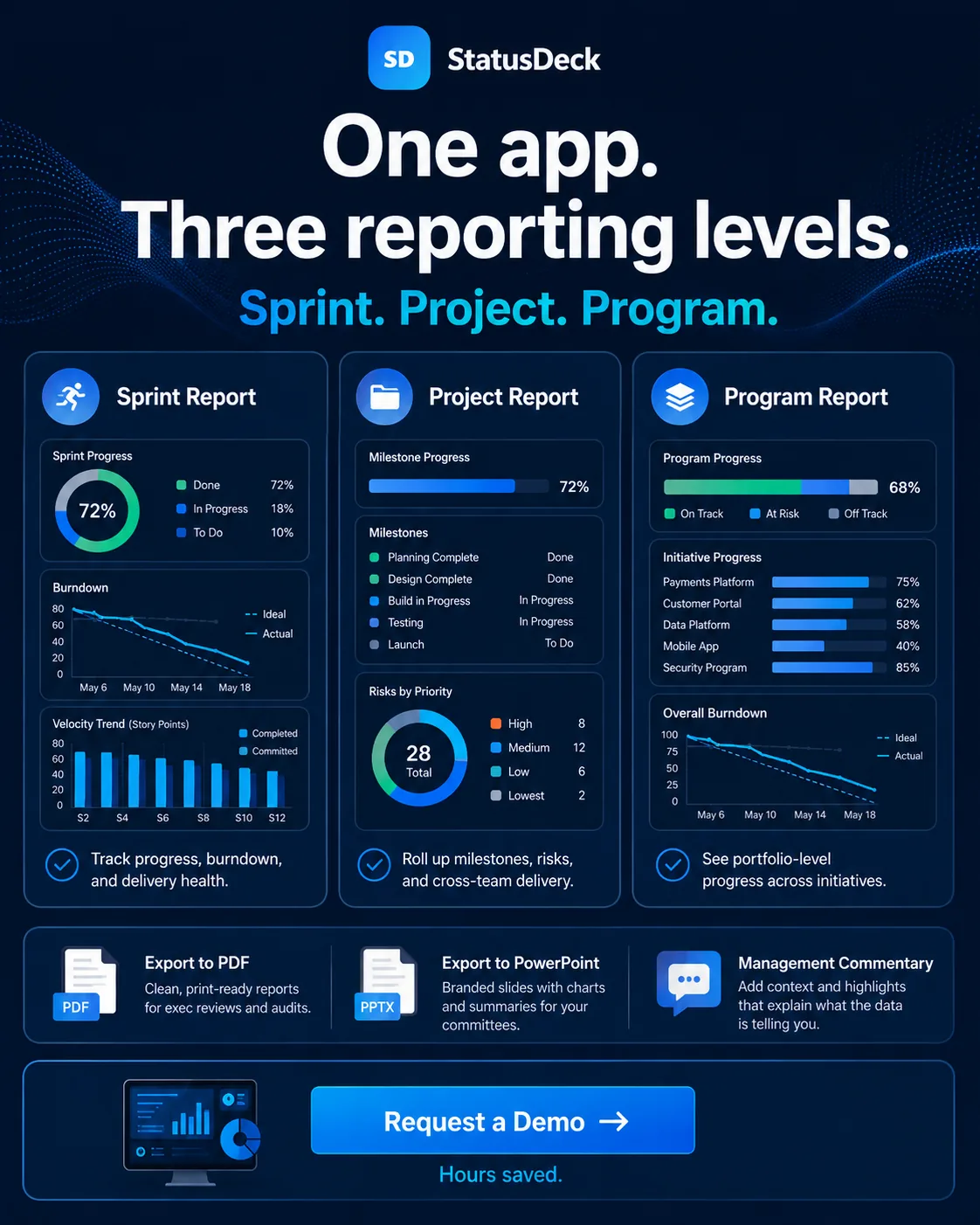
One Reporting Layer · Three Levels
Use the Report That Matches the Conversation
Start with a team sprint, roll up delivery to a project, or review cross-team program health. StatusDeck keeps the reporting experience consistent while changing the level of management visibility.
Sprint Reporting
Track current sprint progress and delivery confidence with the detail needed for reviews and retrospectives.
- Progress, completion and remaining work
- Scope movement and burndown
- Velocity and workload
- Quality, defects and traceability
Project Reporting
Roll up current delivery across boards and teams for project governance and management reviews.
- Project health and teams at risk
- Open work, defects and dependencies
- Operational capacity and team health
- Release and milestone readiness
Program Reporting
Use the same executive reporting model across multiple initiatives, themes and delivery teams.
- Cross-team Delivery Health
- Strategic themes and epics
- Risk and exception visibility
- Release and milestone outlook
Built for the Management Conversation
More Than Charts. A Report That Explains What Needs Attention.
Use real Jira evidence to move from delivery data to executive interpretation, action and stakeholder-ready output.
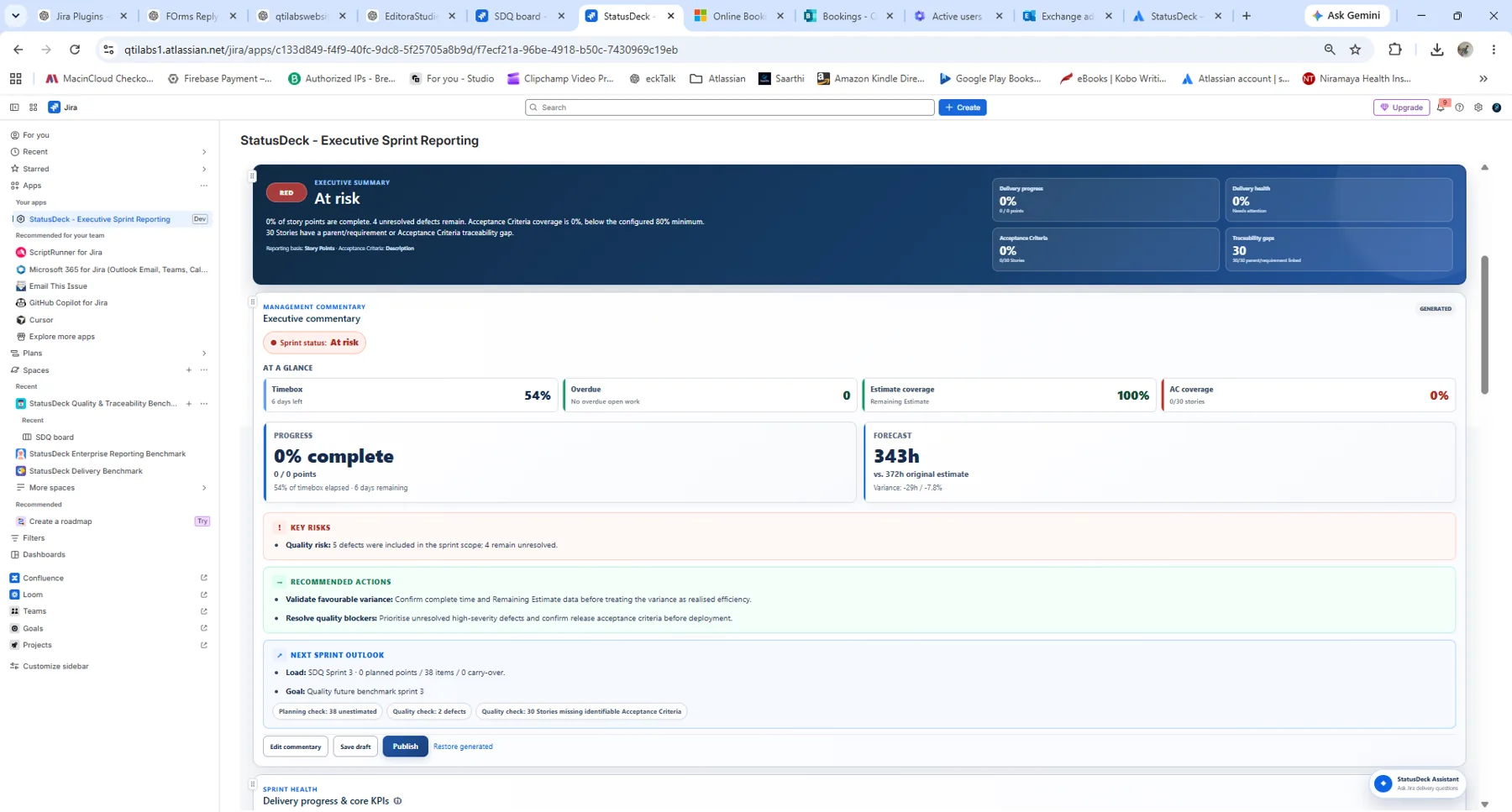
Management Commentary
Progress, Forecast, Risks and Recommended Actions in One Place
StatusDeck generates commentary from the selected Jira reporting scope, then lets users edit, save a draft, publish or restore the generated version.
- At-a-Glance Delivery Signals
- Key Risks and Recommended Actions
- Next Sprint or Release Outlook
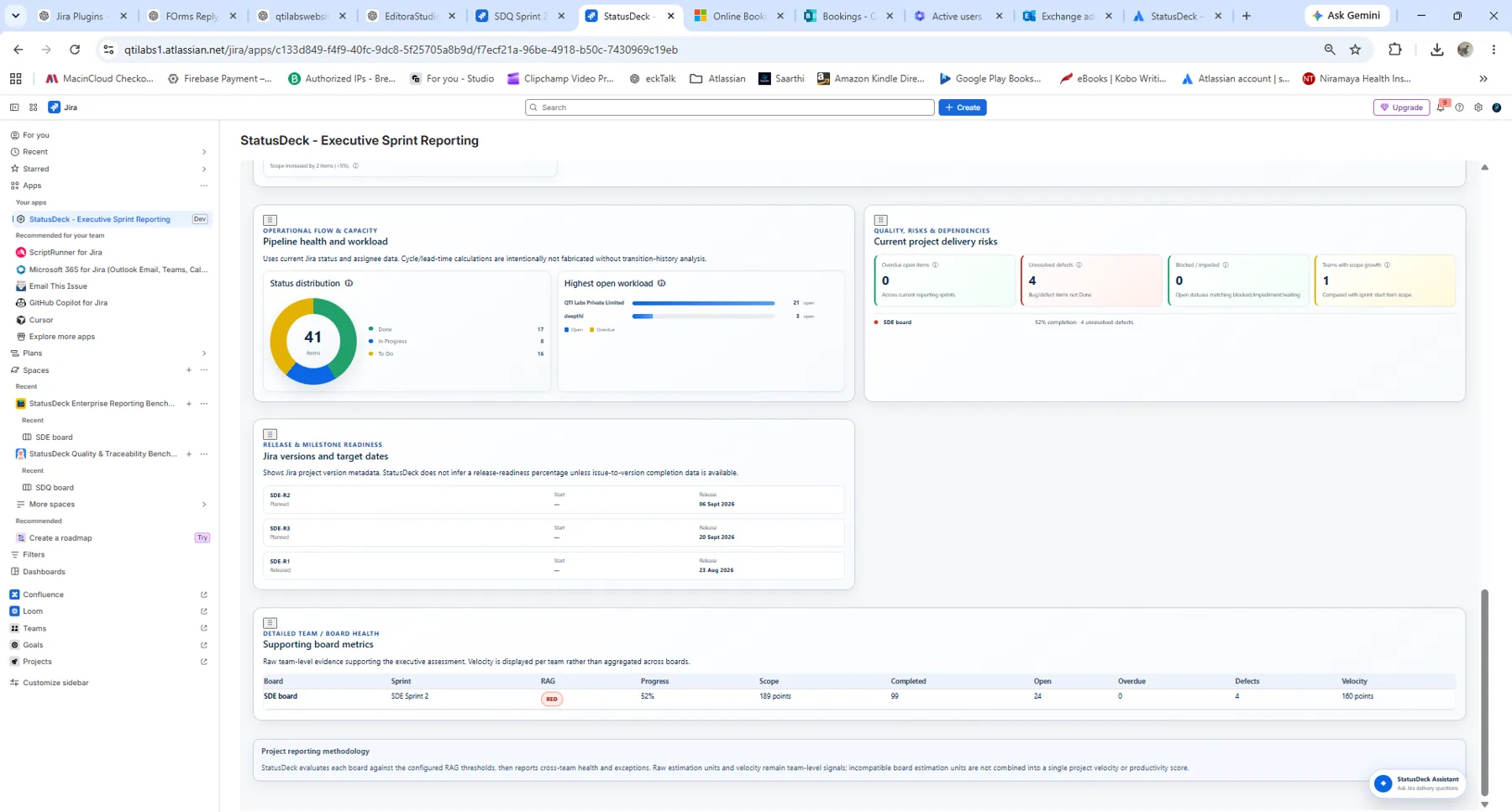
Project & Program Health
Roll Up Delivery Without Losing the Signals Underneath
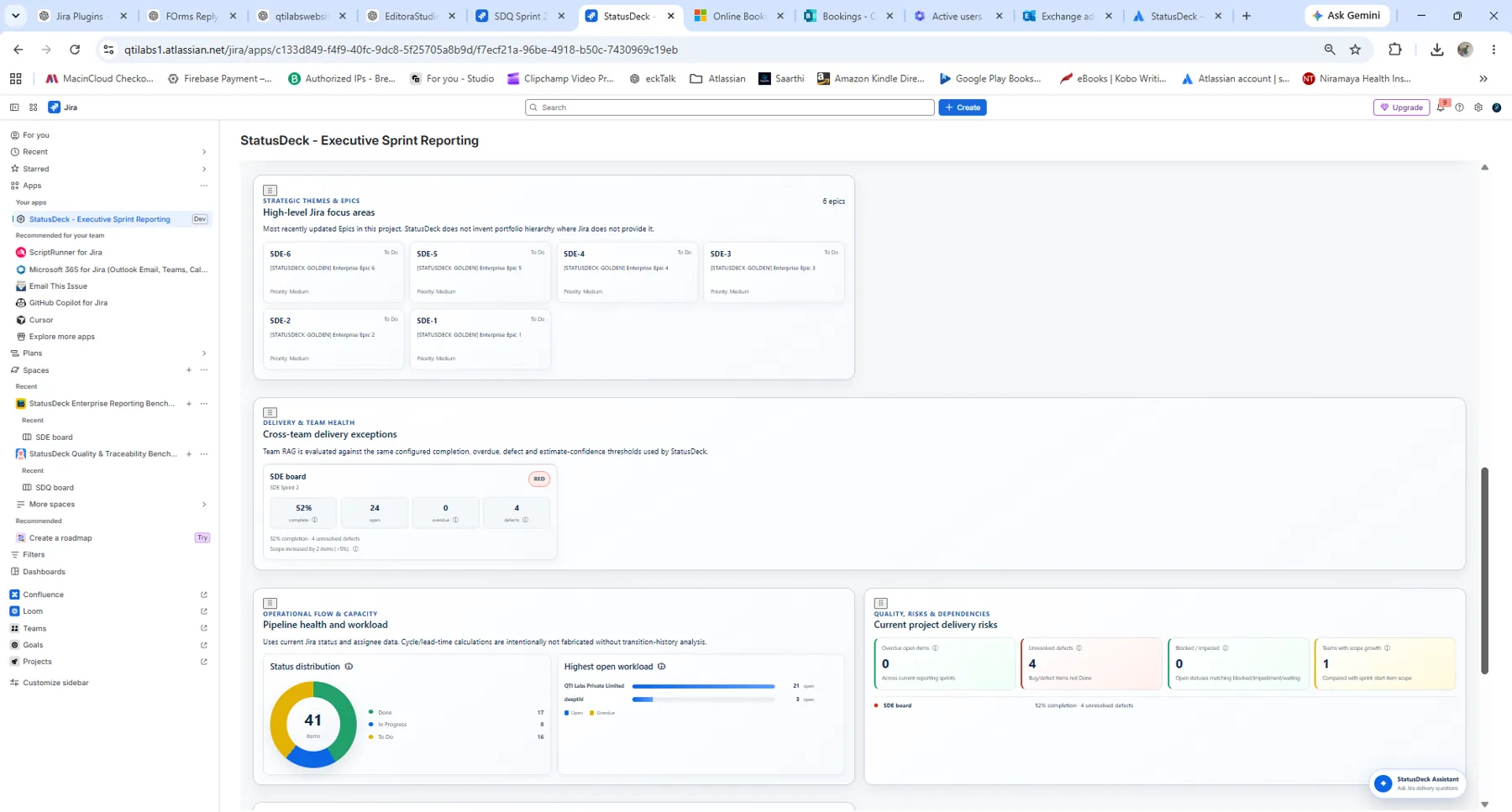
Project and Program Reporting brings team-level health, open work, defects, capacity, strategic themes and release milestones into a management view.
- Teams at risk and cross-team exceptions
- Operational flow and workload
- Release and milestone readiness
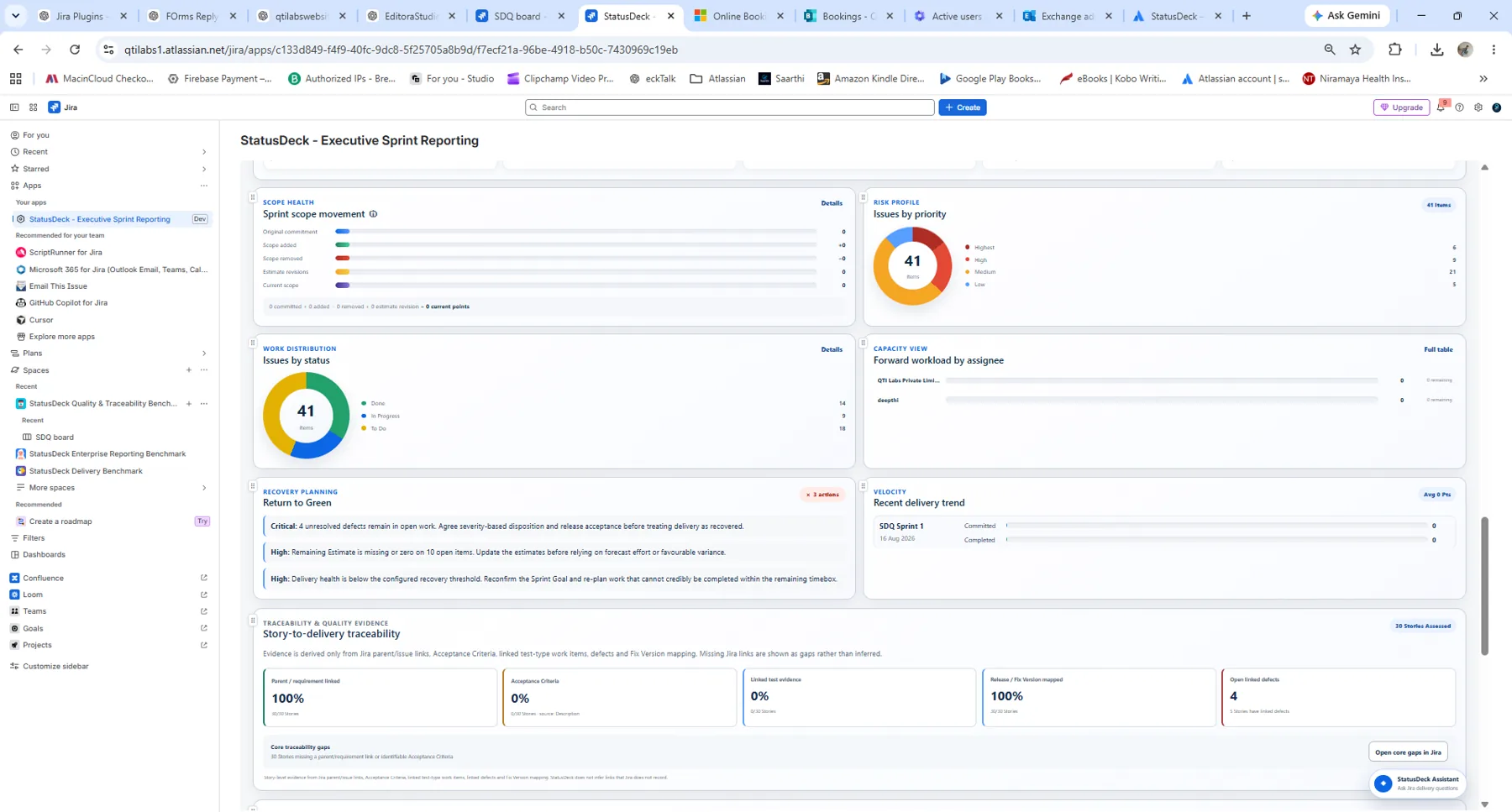
Quality & Evidence
Expose Gaps Instead of Hiding Them
StatusDeck can surface scope movement, defects, Acceptance Criteria coverage, traceability evidence and return-to-green actions using the Jira information available in the reporting scope.
- Scope, priority and work distribution
- Traceability and Acceptance Criteria signals
- Return-to-green recovery actions
A Reporting Workflow, Not Another Dashboard
From Jira Context to Stakeholder-Ready Report
Select Scope
Choose project, report type, board/sprint and the sections needed for the reporting audience.
Generate & Review
Load current Jira data and review Management Commentary, delivery signals, risks, capacity and supporting detail.
Adapt to Your Jira
Configure reporting thresholds or bring in saved filters, Jira dashboards and custom JQL where needed.
Share & Repeat
Export, publish to Confluence and create recurring calendar reminders for the next reporting cycle.
Reporting Operations
Designed Around the Way Recurring Reporting Actually Happens
Configure once, reuse Jira reporting sources, remember the cadence and publish the final management artifact.
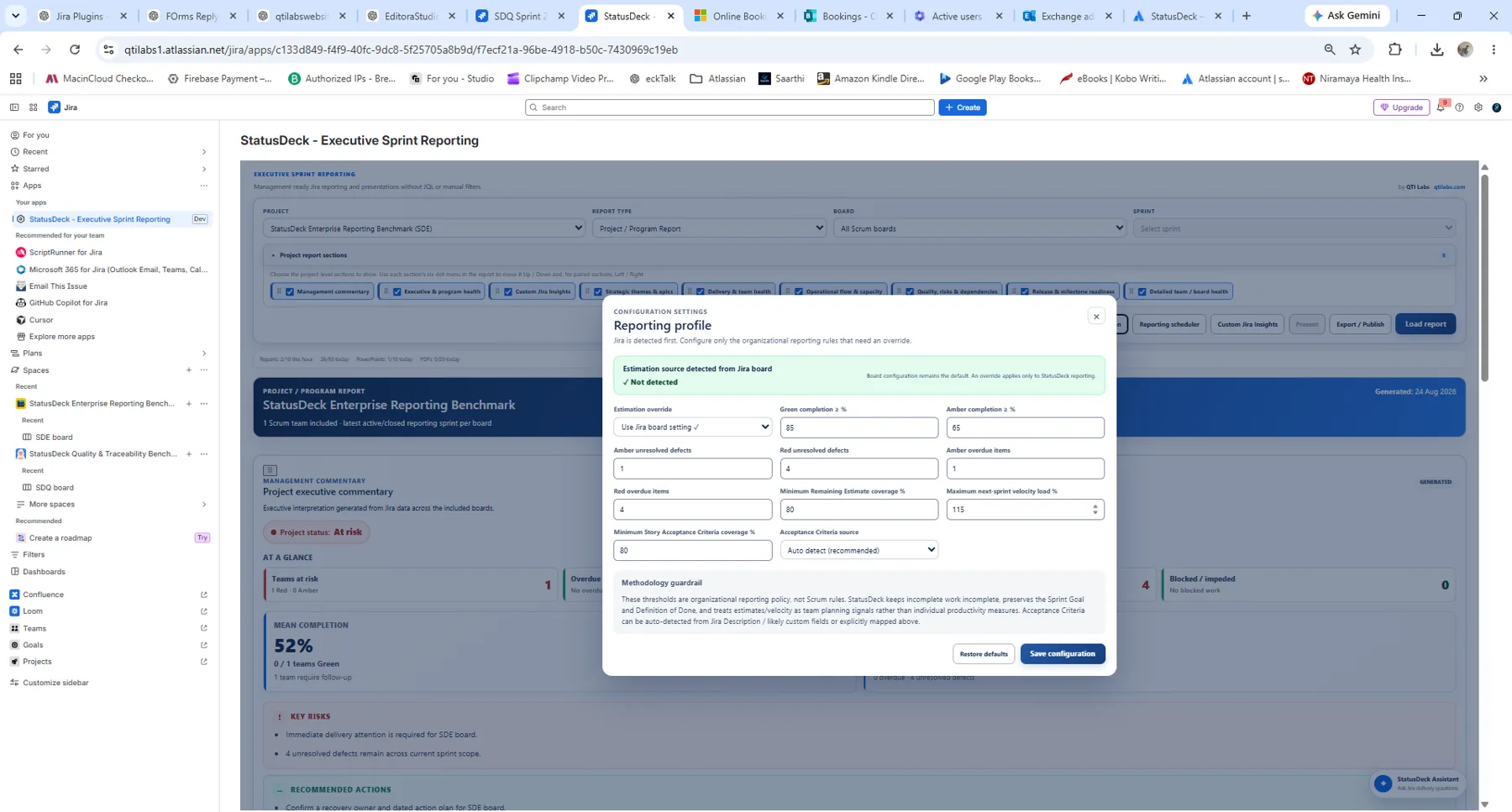
Reporting Profile
Set RAG thresholds, estimate confidence and Acceptance Criteria rules for the reporting context.
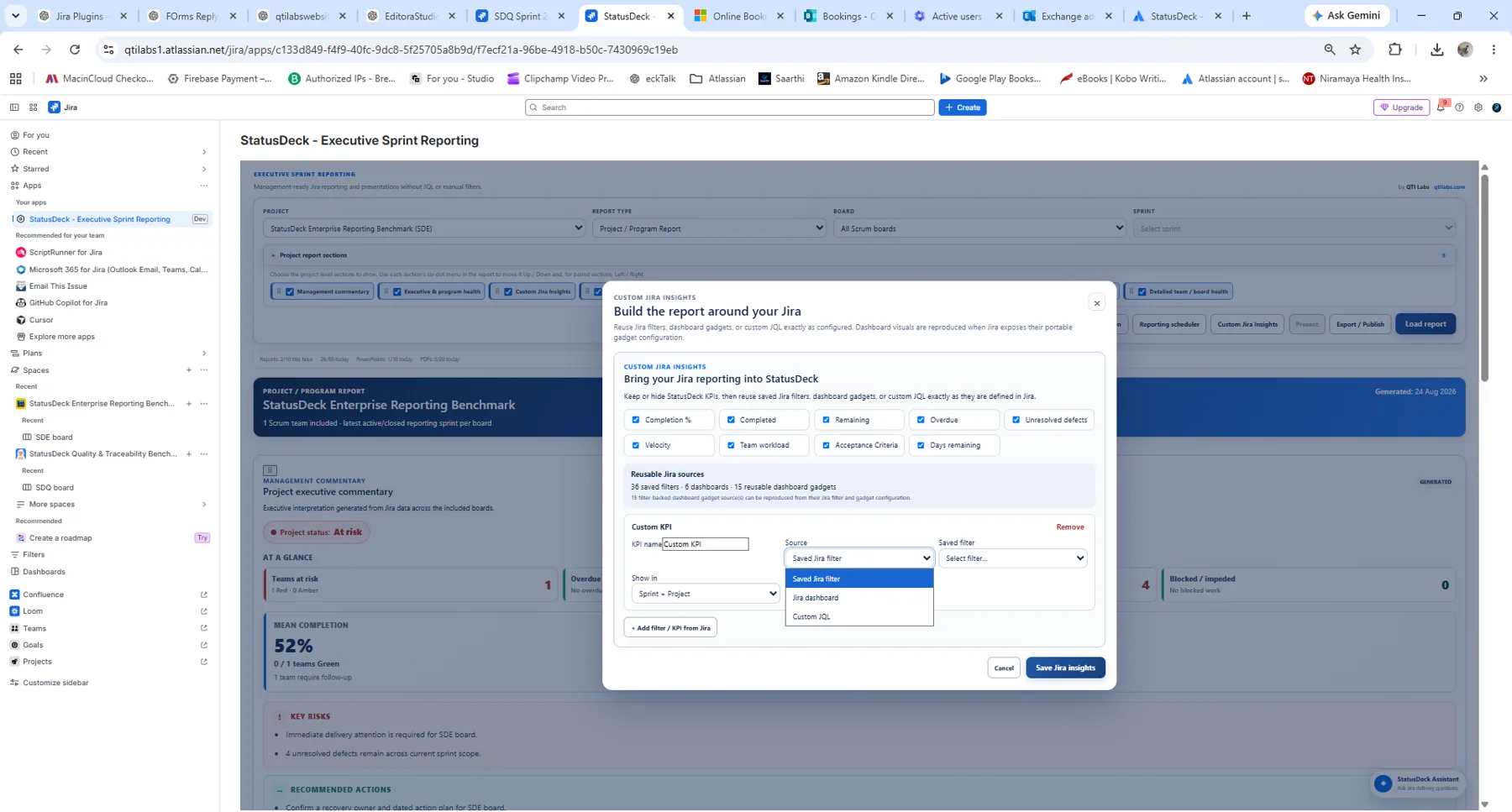
Custom Jira Insights
Reuse saved Jira filters, dashboard gadgets or custom JQL alongside StatusDeck's built-in KPIs.
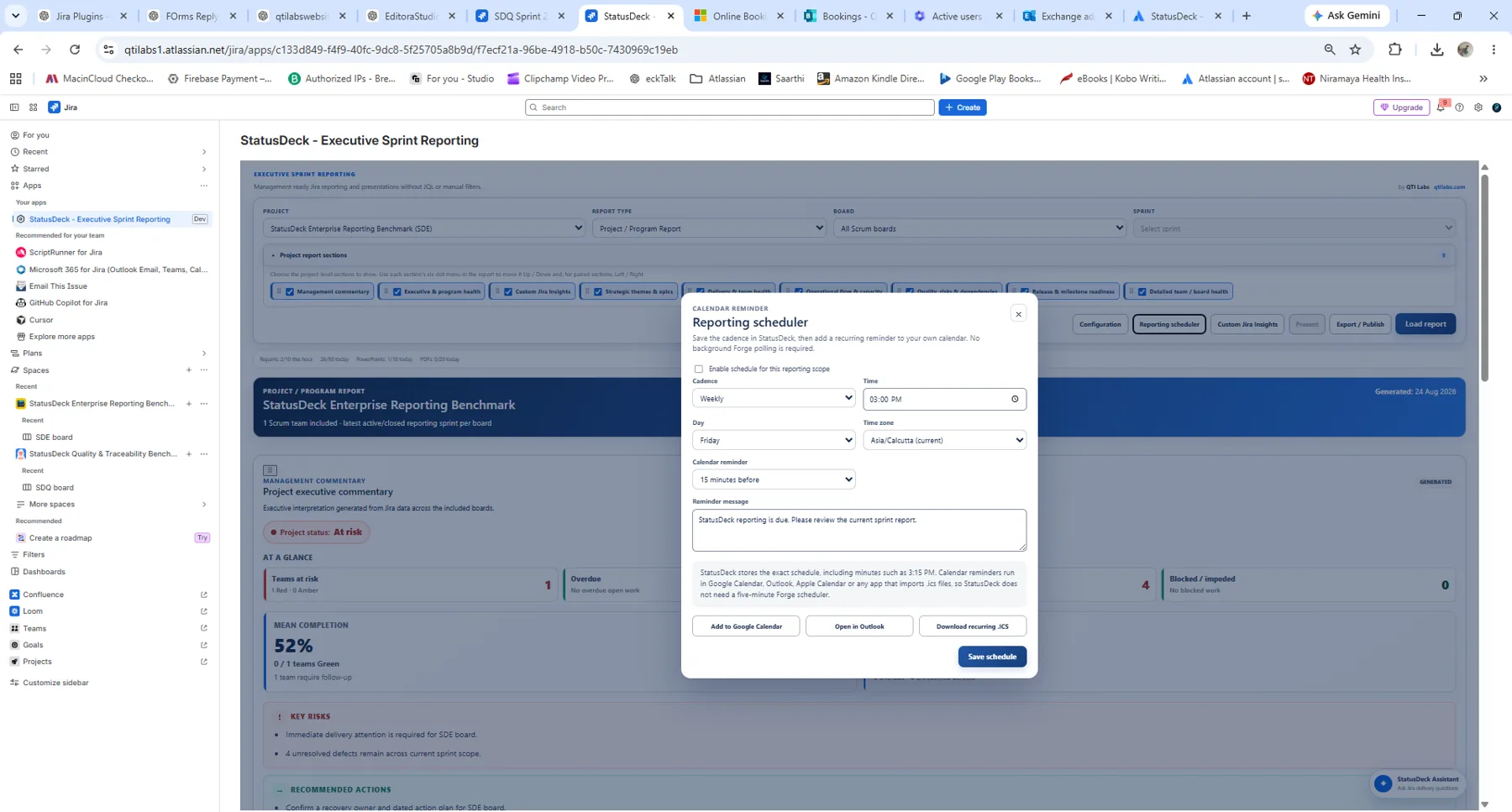
Reporting Scheduler
Create a recurring reminder in Google Calendar, Outlook or any calendar that imports ICS files.
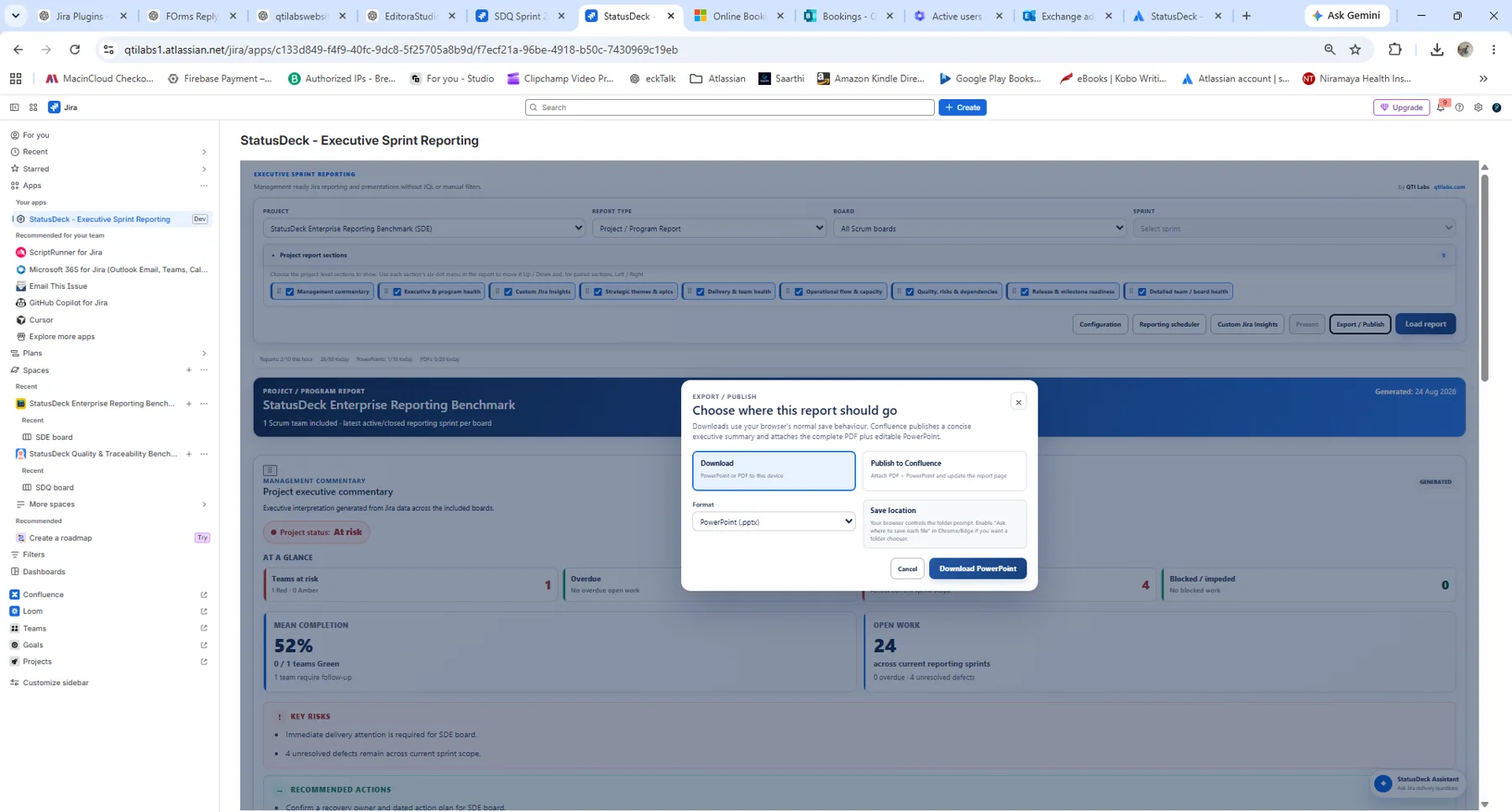
Export & Publish
Download PDF or editable PowerPoint, or publish a concise executive update with report attachments to Confluence.
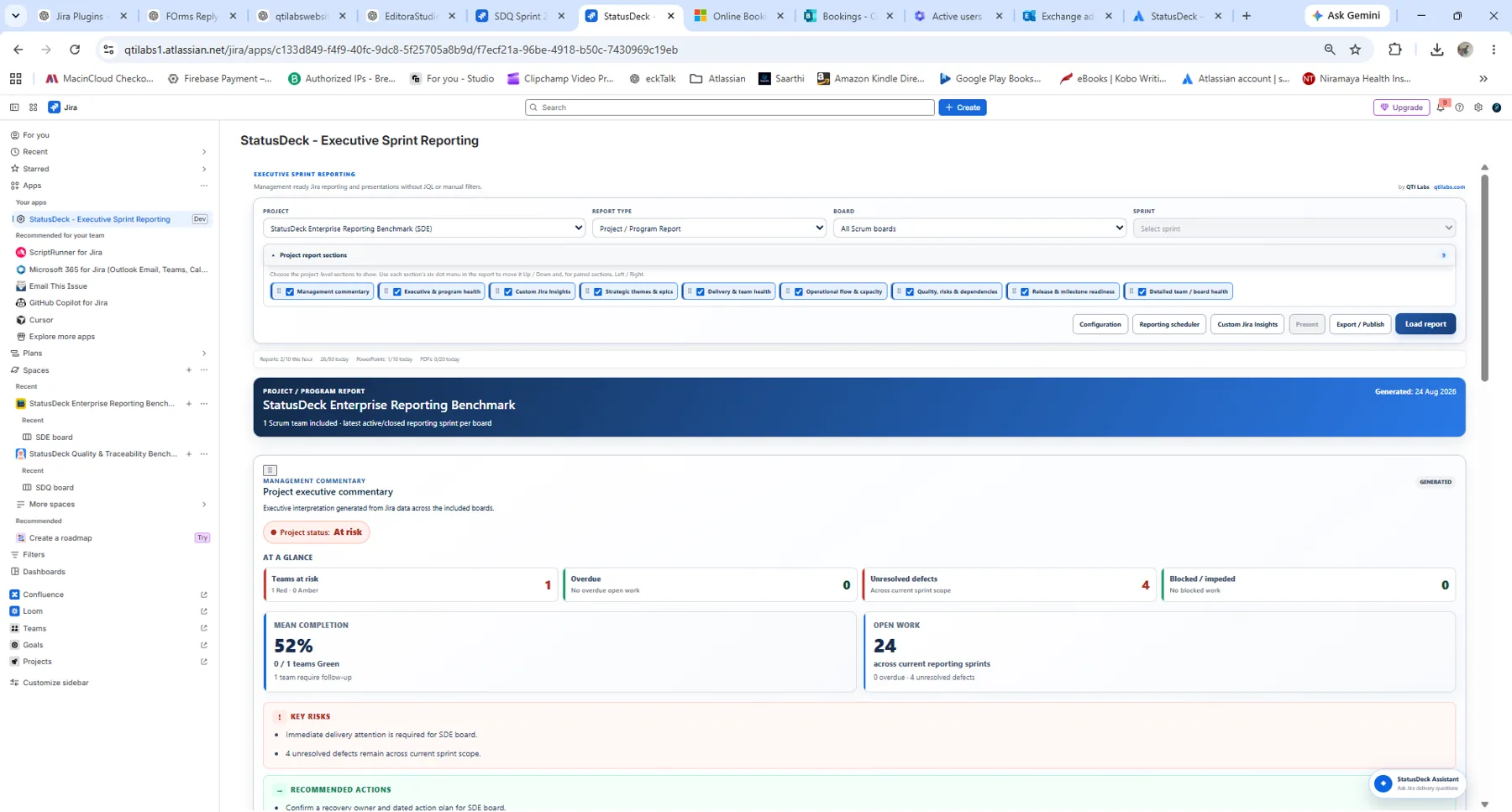
Project / Program Reporting
Use a cross-team reporting scope for project and program management without changing the product workflow.
Executive Narrative
Give stakeholders a concise interpretation of risks, actions, team health and release outlook.
Explore the Real Product
See StatusDeck inside Jira Cloud
Browse Sprint, Project/Program, configuration, scheduler, Custom Jira Insights and export/publishing screens. Select any image for a full-screen preview.
110
Sprint Reporting Workspace
Choose the Jira project, board, sprint and report sections, then load an Executive-Ready Sprint Report.
Jira Cloud Security Model
Reporting Without Building a Separate Customer-Data Platform
StatusDeck is built for Jira Cloud on Atlassian Forge. QTI Labs does not operate a separate external reporting database for customer Jira data. Dedicated documentation is available for scopes, security, privacy, Data Processing and support.
Forge-Hosted AppStatusDeck runs within the Atlassian cloud app model.
Documented ScopesReview the permissions and Jira access required by the app.
Security DocumentationSecurity, privacy, incident response and vulnerability reporting are published.
Customer ControlJira remains the system of record for delivery data.
Request a StatusDeck Demo
See the Sprint, Project and Program workflow with your questions in mind.
Choose a preferred date and time. This is a demo request rather than an automatic booking—we will confirm the slot with you by email.
30-Minute Product Walkthrough
We can focus the session on Sprint Reporting, project/program roll-up, Management Commentary, Custom Jira Insights, scheduling or publishing.
We can focus the session on Sprint Reporting, project/program roll-up, Management Commentary, Custom Jira Insights, scheduling or publishing.
Turn Jira Data into Executive-Ready Reports.
Sprint. Project. Program. Clear insights, shareable output and hours of repetitive reporting work avoided.
Documentation: StatusDeck Documentation · Jira ↔ Confluence Testing Guide · Permissions & Scopes